Three Problems. One Tool.
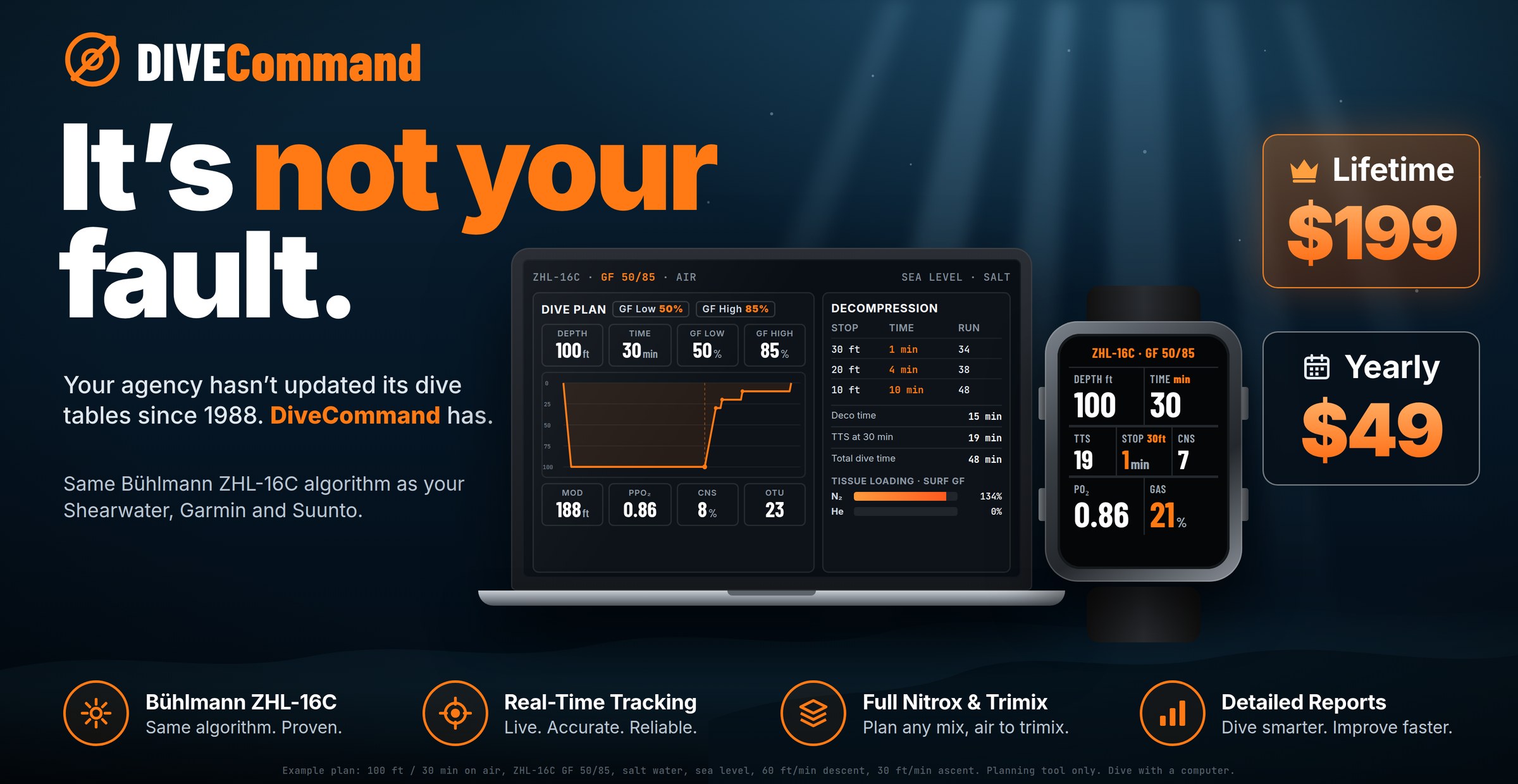
Most dive planning software has at least one of these problems. DiveCommand is a Bühlmann dive planner built specifically to solve all three.
Your Dive Computer Reacts.
DiveCommand Plans.
A dive computer is the right instrument for the dive you’re in — it tracks your real depth, time and tissue loading and tells you what to do right now. What it isn’t built for is looking ahead across a whole trip, lining your plan up against what actually happened, or turning a season of dives into something you can learn from. That’s the rest of dive planning — and it’s where DiveCommand lives.
- ●Responds to the dive in progress — NDL, ceiling and stops as they happen
- ●Where a planner exists, it’s a small-screen, one-dive-at-a-time tool
- ●No calendar view of nitrogen load across a multi-day trip
- ●No side-by-side of what you planned against what you actually dove
- ●Logs live in each manufacturer’s own app — one brand at a time
- ✓Plan before you get wet — every dive, every day of the trip
- ✓Trip calendar — see each day’s projected N₂ load before you leave home
- ✓Import the dives your computer recorded and overlay them on your plan
- ✓Plan vs actual — depth, time and tissue loading, compared dive by dive
- ✓One logbook for every computer you own — Garmin .fit and UDDF files, including Shearwater Cloud exports
Plan the Whole Trip.
Not Just the Next Dive.
Lay out a liveaboard, a dive vacation, or a multi-day project on a calendar. Add the dives you intend to make each day — depth, time, gas, surface intervals — and DiveCommand carries tissue loading forward across every dive and every night, showing you the nitrogen picture of the entire trip before you leave home.
Find the heavy day while you can still change it. Move the deep dive earlier in the week, switch to nitrox on day three, add a rest morning — the whole calendar recalculates. Then check your no-fly time against your flight home.
Your dive computer can only show you the trip one dive at a time, as it happens. DiveCommand shows you all of it, in advance.
Bring In the Dives You Actually Made
Upload the dive files your computer already records. They land in your DiveCommand logbook and in your planners — so the plan, the real dive, and the log finally live in one place, whatever brand is on your wrist.
If a dive goes wrong,
the next steps are one tap away.
Tap the red Emergency button and DiveCommand walks you through the first calls, times the oxygen, and builds an incident summary for EMS and DAN from your own dive log. Free in every version, because nobody should hit a paywall in an emergency.
The facts EMS and DAN ask for, already written down.
When someone is hurt, nobody remembers the max depth, the surface interval or what time the tingling started. DiveCommand already has the dives, so you add only what happened, and the summary builds itself from whatever you’ve filled in.
- “Do this first” steps with tap-to-call EMS (911 / 112) and DAN hotlines.
- Site emergency plans: the local emergency number and nearest ER for each dive site, saved for offline use.
- Incident summary for EMS and DAN: recent dives from your log, symptom timeline and oxygen timeline.
- Oxygen countdown and repeat neuro checks, each time-stamped.
- Your own medical card, kept on your device.
- Add current location so EMS gets the scene’s GPS coordinates.
- Imported dive computer profiles in the summary PRO
DiveCommand records what you enter and what’s in your log. It doesn’t diagnose, and it doesn’t replace EMS, DAN or a physician. Follow your training and emergency services.
A Bühlmann Dive Planner That Runs Your Computer’s Model,
Before You Get Wet.
Shearwater and Garmin dive computers run Bühlmann ZHL-16C with gradient factors. DiveCommand uses the same published constants, compartment half-times and gradient factor method — checked against an independent reference implementation, not against itself.
Millions of automated checks across depths, gases, gradient factors and altitudes, plus a cross-check against DecoTengu, an independent open-source Bühlmann engine. The full results are published, including the conventions we use.
Altitude Corrections. One Tap.
Diving at elevation changes every calculation you make — reduced atmospheric pressure lowers M-values in every tissue compartment, which shortens NDLs. Same depth, same gas, shorter no-stop time. DiveCommand handles it automatically: set your elevation and every NDL, ppO₂, and decompression obligation recalculates instantly. The correction is built into the core ZHL-16C calculation, not a post-processing adjustment.
From First Reef Dive to 220ft Trimix Profile
The same validated engine scales from a single recreational no-stop dive to a multi-gas technical decompression profile — and now from a single dive to a whole trip.
Your Instructor.
Always Available.
DiveCommand includes an interactive AI dive planning assistant — tap the instructor button in the corner of the planner and ask it anything. Why is my NDL shorter at altitude? What does 90% nitrogen load mean? How do gradient factors affect my ascent?
The assistant is set up with DiveCommand’s exact specs — Bühlmann ZHL-16C, gradient factors, altitude corrections, and how every calculation works. It answers in plain language, like a knowledgeable instructor talking through a concept — not a manual entry.
Your dive plans never leave the device. The assistant only needs internet to answer questions — not to run the planner.
Not Self-Comparison. A Second Codebase.
DiveCommand’s ZHL-16C engine is tested against an independent reference implementation with no shared code, using the same published Bühlmann constants, and cross-checked against DecoTengu, an open-source Bühlmann engine. The tests run through the real app code and screens. See every test and the conventions used.
What You Get When the Algorithm Is Exact
Most online dive planners use simplified formulas rather than the full Bühlmann model — and stop at the single dive. Here’s the difference in practice.
| Capability | DiveCommand $49/yr or $199 lifetime | Generic Planners Free / Various |
|---|---|---|
| Full Bühlmann ZHL-16C — not an approximation | ✓ | Approximate |
| GF 50/85 Rec · 50/70 Tech — same presets as Shearwater | ✓ | — |
| Same Bühlmann ZHL-16C model as Shearwater · Garmin | ✓ | — |
| All 16 tissue compartments tracked simultaneously | ✓ | Rarely |
| Custom GF Low / GF High adjustment | ✓ | Sometimes |
| Normoxic trimix to 220ft · EAD · END · ENP · Z-factor | ✓ | Rarely |
| Rock bottom gas calculator | ✓ | — |
| 3-bottle stage/deco gas management | ✓ | — |
| Altitude corrections — sea level to 11,000ft | ✓ | Rarely |
| Freshwater / saltwater density toggle | ✓ | — |
| ppO₂ · MOD · CNS O₂ live tracking | ✓ | Some |
| Trip calendar — projected N₂ load day by day | ✓ | — |
| Import Garmin .fit & UDDF (Shearwater Cloud & more) | ✓ | Rarely |
| Imported dive overlaid on the planned profile | ✓ | — |
| Integrated logbook · SAC rate · plan vs actual | ✓ | Some |
| Multi-day nitrogen carry-over | ✓ | — |
| Free emergency card · incident summary for EMS & DAN | ✓ | — |
| 100% offline · any device · no download | ✓ | Varies |
| Published test results | ✓ | — |
| Interactive AI planning assistant | ✓ | — |
| Lifetime license — no subscription | ✓ | Freemium |
Runs Offline. Works Anywhere.
Remote dive boat. Mountain lake. Liveaboard mid-ocean. DiveCommand installs once and runs completely offline — iOS, Android, Mac, Windows, tablet, or phone. Every tissue calculation, altitude correction, logbook entry, and printed plan works without a connection. A world-class decompression model that fits in your pocket and doesn’t need the internet to think. Only the AI assistant and live conditions need a connection, and only when you use them.
Own Your Software. Own Your Profile.
Start free forever, no card required. Upgrade any time for the full toolkit — trip calendar, dive computer import, AI Instructor, trimix, and more. Buy once and use it forever — no recurring charges when your card expires.
- ✓ Bühlmann ZHL-16C · GF 50/85 · NDLs and repeat dives
- ✓ Nitrox planning — MOD, ppO₂, EAD
- ✓ 16-compartment tissue tracking
- ✓ Hand-entered dive log
- ✓ No-fly minimum wait times
- ✓ Altitude corrections to 11,000ft
- ✓ Emergency card & incident summary for EMS and DAN
- ✓ Offline · any device · no account required
- ✓ Trip calendar planner — projected N₂ load for every day of the trip
- ✓ Dive computer import — Garmin .fit & UDDF (Shearwater Cloud & more)
- ✓ Plan vs actual overlay from imported dives
- ✓ Technical mode: stop-by-stop deco schedules, normoxic trimix to 220ft, EAD, END, ENP, Z-factor
- ✓ Custom GF Low / GF High adjustment
- ✓ Travel gas + 2 deco gases, rock bottom calculator
- ✓ Multi-day nitrogen carry-over + live no-fly countdown
- ✓ Integrated logbook — SAC rate, plan vs actual, CSV export
- ✓ Live conditions check — wind, tide & swell
- ✓ Imported dive computer profiles in the emergency incident summary
- ✓ AI Dive Planning Assistant included
- ✓ All future updates included — no version upgrades to purchase
30-Day Money-Back Guarantee — No Questions Asked. Try DiveCommand free first. If you buy and it doesn’t become your go-to planning tool, email us within 30 days for a full refund. Risk is zero.
Lifetime bonus: the book. Every $199 lifetime license includes Scott’s book Mastering Buoyancy: The Internal Ballast System (PDF and Kindle), emailed with your receipt.
DiveCommand FAQ
Is DiveCommand the same algorithm as my Shearwater or Garmin?
Yes. It runs Bühlmann ZHL-16C with gradient factors, the model Shearwater and Garmin dive computers use. The Rec default, GF 50/85, matches Shearwater’s Rec mode default. Small differences can still come from rounding and ascent rate, and every setting DiveCommand uses is shown on screen.
Does it work without cell service?
Yes. Add it to your home screen once and it runs fully offline on the boat or at a mountain lake. Only the AI assistant and live conditions need a connection, and only when you use them.
Do I need to install anything or make an account?
No. It runs in the browser on iOS, Android, Mac and Windows, with no account. Your dives and plans stay on your device.
What gradient factors does it use?
GF 50/85 in Recreational mode and 50/70 in Technical mode, the same presets as Shearwater. Paid plans let you set your own GF Low and GF High.
How deep can I plan with trimix?
Normoxic trimix to about 220 ft (68 m), with a travel gas and two deco gases. Hypoxic mixes are deliberately left out.
Can I plan altitude and freshwater dives?
Yes. Sea level to 11,000 ft, in fresh or salt water. The correction is built into the ZHL-16C calculation itself, not added afterward.
Which dive computers can I import from?
Garmin .fit files, and UDDF exports from Shearwater Cloud and other dive log software.
Does DiveCommand replace my dive computer?
No. Your dive computer stays the authority underwater. DiveCommand is for planning the dive or the trip, then comparing the plan with what you actually did.
What’s the difference between Annual and Lifetime?
The features are the same. Annual is $49 a year and you can cancel anytime. Lifetime is one $199 payment with all future updates and the Mastering Buoyancy book. Both have a 30-day money-back guarantee.
Written by a Diver, Not a Developer Who Read About It
Scott Fontecchio is a PADI Master Scuba Diver Trainer and SSI Master Instructor with 40+ years of diving experience and 5,000+ dives. He built DiveCommand because he was tired of explaining to students why the planning software said one thing and their Shearwater said another — and tired of planning tools that required a desktop install and 20 minutes to produce a number he could have gotten in 30 seconds.
The testing isn’t a marketing claim. DiveCommand’s engine is checked against a separate implementation built from the same published Bühlmann constants, millions of times over, and every result and convention is published. The math is the same because the same math was used.
Read the test results. Then plan your next dive in DiveCommand, import it from your computer afterward, and compare the two. That’s the whole pitch.
Need Commercial or Public Safety Dive Planning?
DiveCommand is built for recreational and technical divers. The suite also includes two professional-grade planners for different missions.
Full U.S. Navy Rev 7 tables, ADCI/OSHA auto-generated commercial dive plans, N₂ diver status strip for full crew management. Single-user and team licenses.
NIMS/ICS incident command for dive operations. Rescue vs Recovery Mode, OSHA staffing enforcement, chain of custody, contaminated water ops.
Plan It. Dive It.
Compare It. Log It.
Your computer reacts to the dive you’re in. DiveCommand lets you plan the whole trip before you go, import what you actually did, and see the difference. No install, no account, any device.
✓ Imports Garmin .fit & UDDF ✓ Same Bühlmann Model as Shearwater & Garmin
Join the Dive Team. Earn $50 for every DiveCommand Lifetime license bought through your personal link or QR code. Free to join, approved instantly.
Join the Dive Team