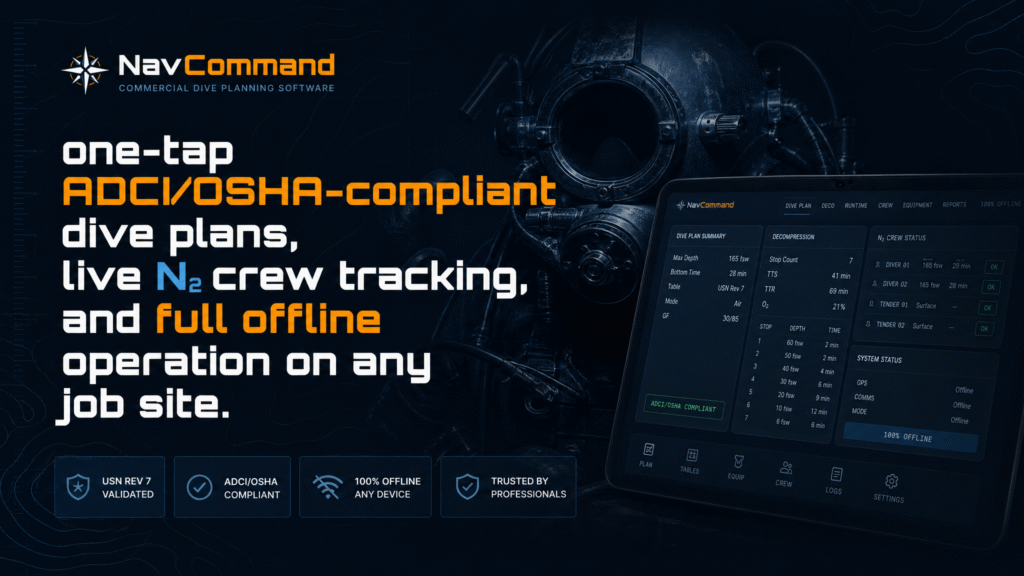
Ditch the Calculators.
Automate the Audit Trail.
The only browser-based commercial dive planner built on entry-by-entry validated USN Rev 7 tables — with one ADCI/OSHA plan for your whole crew, live in-water bottom-time countdowns, one-tap print/email/text export, and full offline operation on any job site.
For Every Operation That Can’t Afford a Table Error
NavCommand was built by a commercial diver with real job-site experience — not a developer who read the manual. It understands what supervisors actually need under pressure.
Three Ways Manual Table Work Costs You
Commercial dive supervisors carry the weight of crew safety and company compliance simultaneously. Manual processes create three specific points of failure.
Generic apps use mathematical approximations of the Navy tables — close enough until an OSHA inspector or prime contractor asks you to show your work. NavCommand uses the actual published values, verified entry-by-entry. When the audit comes, your logs match the manual exactly.
Manually tracking residual nitrogen, surface intervals, and adjusted NDLs for a four-man crew across a multi-dive day takes time you don’t have and introduces calculation errors you can’t afford. NavCommand tracks every diver’s nitrogen loading in real time — you read the result, you don’t calculate it.
Filling out 24-item safety checklists, emergency contact sheets, and ADCI-compliant dive plans by hand after a hard shift cuts straight into your margin. NavCommand generates the complete document automatically from your planned profile — one tap from dive plan to compliance paperwork.
Plan the Profile.
The Software Writes the Plan.
Select depth and bottom time. NavCommand immediately returns your pressure group, NDL remaining, surface interval credit, and adjusted NDL for the next dive — pulled directly from validated USN Rev 7 tables, not calculated from a formula approximation.
The N₂ Diver Status Strip tracks every diver on your roster simultaneously. Supervisor, Diver 1, Standby, Tender — each shows their current pressure group in real time across the full shift. When Diver 1 finishes a rotation, their adjusted NDL for Dive 2 is already calculated and waiting.
When you’re ready to dive, tap once. NavCommand generates your complete ADCI/OSHA commercial dive plan — for one diver or the whole crew on one Team Plan — with the 24-item checklist, deco schedules attached, emergency contacts populated and signature blocks ready. Then print, email, text or share it straight from the viewer. The paperwork takes seconds, not an hour.
One Report. Live Status. Instant Export.
Three upgrades built from job-site feedback: the whole crew on one ADCI/OSHA plan, a live bottom-time countdown for every diver in the water, and a report viewer that sends the paperwork anywhere.
Every Diver.
One ADCI/OSHA Plan.
Stop filling out a separate plan for each diver. The Team Plan pulls every dive from today’s schedule into one document: the job site, emergency contacts, equipment checklist and supervisor signature once, then a row for each diver.
- ✓ Diver table: certification, depth and table row, bottom time, gas and ppO₂, repetitive residual time, deco, exit group and CNS%
- ✓ Automatic flags: expired medicals, ppO₂ over 1.4 or 1.6, CNS ≥ 80%, dives beyond the tables
- ✓ Every deco diver gets their own stop schedule and a banner naming them at the top of the plan
- ✓ Sign-off for supervisor, company rep and standby, plus a briefing acknowledgement line for every diver
3 divers · Doc # NC-T-0924
| Diver | Depth | BT | Gas | Deco | Grp | CNS |
|---|---|---|---|---|---|---|
| Chen, D. | 60ft | 40 | Air 0.59 | No | H | 0.0% |
| Okafor, S. | 100ft | 30 | Air 0.85 | YES TAT 6 | J | 7.3% |
| Reyes, A. ⚠ MEDICAL EXPIRED | 90ft | 30 | EAN32 1.19 | No | I | 14.1% |
| Okafor, S. 100ft / 30 min | 20ft · 3 min | TAT 6 min · Grp J |
Know Every Diver’s
Time Left, Live.
Tap Start when a diver leaves the surface. NavCommand runs a live countdown for every diver in the water: elapsed time, planned bottom time left, and time to the no-decompression limit.
- ✓ Pinned status bar: every diver in the water, most urgent first, visible wherever you scroll
- ✓ Scuba-tank gauge drains as bottom time is used, going green → amber → red
- ✓ Alerts with sound and vibration at 5 min, 1 min, time up and NDL exceeded
- ✓ Survives a reload or a phone going to sleep, and pre-fills actual bottom time when you log the dive
Print It. Send It.
Fix It in Seconds.
Every report — the dive plan, the ADCI/OSHA plan, the Team Plan and the Day Summary — opens in a built-in viewer with one toolbar. Edit takes you straight back to the form; change a bottom time and regenerate. ✕ takes you back to where you were.
- ✓ Print / Save as PDF for the project file or the client
- ✓ Email or text the plan to the office, prime contractor or crew from the job site
- ✓ Share the report file to Mail, Messages, AirDrop or Drive from your phone
- ✓ CSV and JSON backup of the day log for billing and records
The Complete Document.
Auto-Populated.
NavCommand reads your planned dive and generates the complete commercial dive plan automatically. Everything an ADCI audit or OSHA inspection expects to see — filled in, formatted, and ready to sign.
No manual data entry after a hard shift. No retyping the same information into three different forms. Plan the dive, tap once, sign twice. The paperwork is done before the diver is in the water.
- ★ New: Team Plan — every diver on today’s schedule on one plan, with a sign-off line for each diver
- ✓ 24-item ADCI equipment checklist — tick items off on your phone; anything unconfirmed is flagged on the printed plan
- ✓ Full decompression schedule from USN Rev 7 — attached automatically when required
- ✓ Personnel section per OSHA 1910.410 — supervisor, diver, standby, tender
- ✓ Emergency aid list per OSHA 1910.421(b) — nearest chamber, hospital, Coast Guard / local emergency, DAN, transport ETA
- ✓ Signature blocks — diver, supervisor and company representative
- ✓ Date-stamped document number for your filing system
- ✓ Environmental conditions, bottom composition, current, visibility
- ✓ Exceptional exposure flag auto-populated from dive parameters
- ✓ Print/PDF, email, text or share from the built-in viewer — tap Edit to change and regenerate
From Dive Plan to Signed Paperwork in Four Taps
No forms to retype, no tables to cross-reference. Plan each diver’s dive once and NavCommand builds the OSHA dive record, the ADCI plan and the export for you.
Built to the Regulations Commercial Divers Work Under
NavCommand’s limits aren’t guesses. Each one traces to 29 CFR Part 1910, Subpart T or the U.S. Navy Diving Manual, Revision 7, so you can show an inspector exactly where it came from.
NavCommand is a planning and documentation tool based on the U.S. Navy Diving Manual, Revision 7, and 29 CFR Part 1910, Subpart T. It does not replace your safe practices manual, a qualified dive supervisor, diver training, or a calibrated dive computer. Regulatory applicability varies by jurisdiction and employer; consult your safety officer or counsel. Source: eCFR 29 CFR 1910 Subpart T
Everything a Commercial Supervisor Needs
NavCommand was built for the job site, not the classroom. Every feature solves a real problem that commercial dive supervisors face on multi-dive, multi-diver operations.
Every NDL, pressure group letter, residual nitrogen time, decompression stop, and total runtime verified entry-by-entry against the published U.S. Navy Diving Manual Revision 7. 12,067 independent tests — zero failures, zero discrepancies. No approximations. When the auditor asks to see your tables, you hand them the same document NavCommand was built from.
✓ Exact Match · USN Rev 7Live nitrogen tracking for your entire crew from a single supervisor screen. Supervisor, Diver 1, Standby, Tender — each diver’s current pressure group updates automatically after every dive. Stop doing the math in your head. Read the strip, call the rotation, log the dive. The adjusted NDL for the next dive is already there.
✓ Multi-Diver · Real-TimeTap once. Get a complete, signable commercial dive plan: 24-item ADCI equipment checklist, decompression schedule from USN Rev 7, personnel section per OSHA 1910.410, emergency aid list per OSHA 1910.421(b), signature blocks, and date-stamped document number — for one diver or the whole crew. Your dive plan writes itself.
✓ ADCI · OSHA 29 CFR 1910Full USN Rev 7 repetitive dive workflow: pressure group designation from Dive 1, surface interval credit, residual nitrogen time lookup, adjusted NDL for Dive 2. Cold/strenuous modifier (−20% NDL) available for demanding conditions. Altitude TOD correction with Lake Tahoe 6,225ft preset.
✓ RNT · Adjusted NDL · Multi-DiveEvery schedule comes from USN Rev 7 Table 9-9 for 30–190 fsw: every stop deepest-first, total ascent time, repetitive group on surfacing and exceptional-exposure flags. Air and nitrox only — the OSHA 1910.425 surface-supplied limit is built in. Tech gas planning covers doubles, stage and bailout bottles; surface supply mode includes a 37-tank library.
✓ 190 fsw · OSHA 1910.425 · Surface SupplyRemote pipeline barge with no cell service. Inland reservoir with no WiFi. Offshore platform. NavCommand installs once as a browser app and runs completely offline from that point forward — iOS, Android, Windows, Mac, tablet, or ruggedized laptop. Every calculation, every dive plan, every report works without a connection.
✓ Offline-First · Any DeviceEvery dive logged as you go — diver, depth, bottom time, pressure group, gas, times. Export the full day log as a clean CSV or JSON backup for your project records, billing or OSHA 1910.423(d) dive records. No manual transcription after a long shift — the log is built as the day runs.
✓ Day Log · CSV · OSHA RecordsEvery diver on today’s schedule in one ADCI/OSHA plan: shared site, emergency and checklist sections, a row per diver, a deco schedule for each deco diver, automatic flags for expired medicals and ppO₂/CNS limits, and a sign-off line for every diver.
★ New · Multi-DiverTap Start and every diver in the water gets a live bottom-time countdown, a draining tank gauge and a time-to-NDL clock. A pinned bar shows the whole crew wherever you scroll, with sound and vibration alerts at 5 min, 1 min, time up and NDL exceeded.
★ New · Live Timers · AlertsEvery report opens in a built-in viewer: Print/PDF, Email, Text, Share or Save in one tap. Edit jumps back to the form so you can change a bottom time and regenerate, and ✕ returns you right where you were.
★ New · PDF · Email · Text · ShareWorking on a mountain reservoir? Inland lake at elevation? NavCommand’s altitude TOD correction adjusts your table depth automatically — Lake Tahoe 6,225ft is a built-in preset. Freshwater vs saltwater density toggle corrects ATA calculations for true operational accuracy.
✓ Altitude · Freshwater · TODOne fleet license covers every supervisor, diver, and device in your company — no per-seat fees, no annual renewals, no counting users. Buy once and every person in your operation has NavCommand on every device they carry. When new supervisors join, they’re already covered.
✓ Unlimited Users · Company-WideVerified Against the Same Manual Your Inspector Uses
NavCommand’s USN Rev 7 engine was validated across 12,067 independent tests in 22 harnesses — six real bugs found and fixed before first deployment. Every NDL, pressure group, surface interval, deco schedule, and runtime was verified entry-by-entry against the published U.S. Navy Diving Manual Revision 7. When an auditor pulls out the manual, your logs will match it exactly — not approximately, not within a rounding margin. Exactly. The validation harnesses are self-contained HTML files. Any inspector, supervisor, or dive medical officer can open them in a browser and run all 12,067 tests independently.
What Approximation-Based Planners Can’t Give You
Most commercial dive software uses a formula approximation of the Navy tables. That works fine until someone asks you to show your work against the published source.
| Capability | NavCommand $499–$1,999 |
Generic Planners Various |
|---|---|---|
| Entry-by-entry verified USN Rev 7 tables | ✓ | — |
| Independent validation harness (public) | ✓ | — |
| Zero-approximation NDL / deco / RT values | ✓ | — |
| One-tap ADCI/OSHA commercial dive plan | ✓ | — |
| 24-item ADCI equipment checklist | ✓ | — |
| Supervisor, company rep & per-diver sign-off | ✓ | — |
| OSHA 29 CFR 1910.410 personnel section | ✓ | — |
| OSHA 29 CFR 1910.421(b) emergency aid list | ✓ | — |
| Live N₂ multi-diver status strip | ✓ | — |
| ★ Multi-diver Team Plan — one ADCI/OSHA report | ✓ | — |
| ★ Live in-water bottom-time timers with alerts | ✓ | — |
| ★ Print / email / text / share from the report | ✓ | Some |
| OSHA 1910 depth limits enforced & cited | ✓ | — |
| Repetitive dives — pressure groups, RNT, adjNDL | ✓ | Rarely |
| Cold / strenuous −20% NDL modifier | ✓ | — |
| Altitude TOD correction | ✓ | Rarely |
| Freshwater / saltwater density toggle | ✓ | — |
| Deco planning to 190 fsw — USN Rev 7 Table 9-9 | ✓ | Some |
| Surface supply mode · 37-tank library | ✓ | — |
| Day log + CSV export | ✓ | Some |
| 100% offline · any device | ✓ | Varies |
| Lifetime license — no subscription | ✓ | Usually not |
| Fleet license — unlimited users | ✓ | Per-seat |
Works Wherever the Job Takes You
Remote barge with no cell coverage. Offshore platform in a signal dead zone. Inland reservoir with no WiFi. NavCommand installs once and runs completely offline from that point forward — iOS, Android, Windows, Mac, tablet, or ruggedized laptop. Every calculation, every ADCI dive plan, every CSV export works without a connection. Professional-grade commercial dive planning software that belongs on the job site, not tethered to an office internet connection.
No Subscriptions. No Monthly Fees. No Seats to Count.
Buy your license once, use it forever. All future updates included. Your divers aren’t a line item — they’re covered.
Solo Supervisors & Small Operations
- ✓ Full USN Rev 7 Standard Air + Deco tables
- ✓ Validated against U.S. Navy Diving Manual Rev 7
- ✓ Repetitive dive planning — groups, RNT, adjNDL
- ✓ ADCI/OSHA commercial dive plan — auto-generated
- ✓ 24-item ADCI equipment checklist
- ✓ N₂ diver status strip — full crew tracking
- ✓ Cold/strenuous −20% modifier · altitude corrections
- ✓ Surface supply mode · 37-tank library
- ✓ Deco planning to 190 fsw · air & nitrox
- ★ Team Plan · live in-water timers · one-tap export
- ✓ Day log · CSV export
- ✓ 100% offline · any device
- ✓ All future updates included
Multi-Supervisor Operations & Companies
- ✓ Unlimited supervisors, divers, and devices
- ✓ Company-wide coverage — one purchase, forever
- ✓ Everything in Supervisor license, for every person
- ✓ Full USN Rev 7 Standard Air + Deco tables
- ✓ ADCI/OSHA commercial dive plans — all supervisors
- ✓ N₂ status strip · day log · CSV export
- ✓ Cold/strenuous · altitude · freshwater corrections
- ✓ Deco planning to 190 fsw · surface supply
- ★ Team Plan · live in-water timers · one-tap export
- ✓ New supervisors added — already covered, no upgrade
- ✓ All future updates · offline-first · any device
Contact commercial accounts → scott@diverobotix.com
Built by a Supervisor Who’s Run the Tables for Real
Scott Fontecchio is a PADI Master Scuba Diver Trainer, SSI Master Instructor, and ADCI-aware commercial diver with 40+ years of diving experience at Lake Tahoe and beyond. He’s managed multi-barge simultaneous lifts at 145 feet — three barges at once, coordinated with Parker Diving and Big Valley Divers — conducted ROV cable surveys for AT&T across 10 miles of lakebed, and operated under TRPA contracts for AIS and zebra mussel inspections.
NavCommand was built because he was tired of watching commercial supervisors manage multi-diver repetitive dive days with a clipboard and a printed table. The N₂ status strip, the one-tap ADCI plan, the validated tables — none of it is there because a developer thought it sounded useful. It’s there because he’s run those dives and knows exactly where the errors happen.
The validation report is public. Put your standard operational profiles into NavCommand and run them side by side with the published USN Rev 7 manual. The numbers will match — to the digit.
Put the Engine to the Test.
Then Put It to Work.
Try NavCommand free — no account, no credit card, no download. Load it on your phone right now and run your standard profiles against the published manual. When the numbers match, you’ll know it’s the real thing.
✓ No Subscriptions ✓ All Future Updates Included ✓ ADCI / OSHA 29 CFR 1910 Compliant